

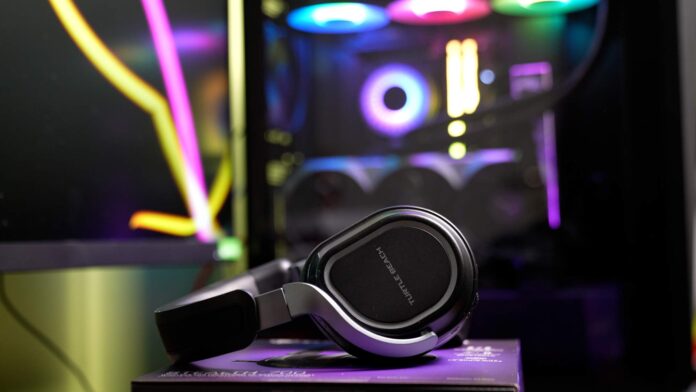
The Turtle Beach Stealth 700 Gen 3 headset is a real wireless powerhouse for gamers and more. I use it every day for work at my computer and for evening gaming sessions on PC. And when needed, I can quickly connect it to a TV or other Bluetooth capable device. After a few weeks with this headset, I have to admit it makes an impression. It’s not without flaws, though. In this review I’ll share my subjective pros and cons of the Stealth 700 Gen 3. I received this unit directly from the manufacturer. Thank you for supporting my blogs and channels.
Let’s start with the technical stuff
The Stealth 700 Gen 3 is a wireless over ear headset with closed back earcups, equipped with large 60 mm drivers in the Eclipse Dual Drivers design. That means each earcup uses a dual setup: a dedicated woofer for low frequencies and a tweeter for highs. The frequency response is the standard 20 Hz – 20 kHz, but the very presence of 60 mm drivers suggests a powerful, “full” sound. And indeed, the sound is big and impactful: the low end reaches deep, and the highs are slightly boosted to sharpen details like footsteps or gunshots in games. The sound signature is typically gaming oriented (emphasized bass and treble) rather than neutrally audiophile. That works for me: explosions hit with impact, and electronic music or hard rock have the right energy. What’s important, the mids don’t disappear completely. Dialog in movies and games, and vocals in music, are still clear. If needed, you can also adjust the EQ: the app includes a 10 band equalizer with presets and the ability to save your own settings.

One of the biggest differentiators of the Stealth 700 Gen 3 is dual wireless connectivity. The headset supports 2.4 GHz (via the included USB transmitters) and Bluetooth 5.2 at the same time. In practice, that means you can play on PC using the low latency dongle while also pairing the headset over Bluetooth to your phone or TV and hearing audio from both sources simultaneously. What’s more, Turtle Beach includes two USB transmitters in the box, so you can plug one into a PC and the other into a PS5 or Xbox. Thanks to CrossPlay Dual Wireless, you can keep one dongle in your PC and the other in your console and switch between them with a button on the right earcup (the CrossPlay button). Competitors basically don’t offer this kind of solution. Usually headsets work with one platform, or they require manual swapping of the transmitter. Here it’s great and hassle free. I often use the 2.4 GHz connection with my PC, and when I want to take a call or play music from my phone, I simply add the Bluetooth audio. The headset has separate volume dials for 2.4 GHz audio and Bluetooth audio, so it’s easy to balance both sources. It’s genuinely addictive – it’ll be hard for me to go back to a headset that can’t mix two devices at once.
Swarm app

Of course there’s also an app: Turtle Beach Swarm II, available on PC and on mobile devices. It lets you customize a lot, from the EQ mentioned above, through microphone settings (sensitivity, mic monitoring, noise gate, etc.), to assigning functions to the extra dial and button. For example, you can set the lower dial to adjust bass level or mic volume, and set the Mode button to switch sound profiles or enable Superhuman Hearing. Speaking of which, Superhuman Hearing is another Turtle Beach gimmick that in theory boosts subtle environmental sounds (especially footsteps, reloads, and so on) to give you an advantage in competitive FPS games. In practice, though, it doesn’t add much. In my opinion it can even make the overall sound worse by over sharpening it. It’s good that it’s only an optional toggle, not a permanent effect.
Since we’re talking about standout features, it’s also worth mentioning battery life. The Stealth 700 Gen 3 claims up to 80 hours on a single charge. That’s an excellent result. For comparison, many popular wireless models offer 20-40 hours, maybe around 70 hours (for example the Razer BlackShark V2 Pro 2023 is rated at about 70 h), and the absolute record holder is the HyperX Cloud Alpha Wireless (up to 300 h, at the cost of having no Bluetooth). In my usage, the Turtle Beach headset really does last a long time. I charge it on average once every dozen or so days, with daily use for a few hours. Importantly, there’s fast charging too: just 15 minutes on the USB-C cable is enough for about 3 hours of gaming. That’s great when you realize right before a session that the headset is low – plug it in briefly and you can continue.
A few words about Bluetooth connectivity. We have Bluetooth 5.2 here, but the supported codecs are basic SBC and probably AAC. There’s no LDAC, so it looks like the more advanced codecs are missing. In practice, sound quality over Bluetooth is good, though not audiophile. You hear a bit less detail and dynamics than over 2.4 GHz, but for watching movies or playing on a Switch it’s absolutely fine. I’d rate Bluetooth latency as low. I didn’t notice an annoying audio video mismatch while watching Netflix on a TV. Range is also excellent: I can walk around the entire apartment without signal dropouts, both on the 2.4 GHz dongle and over Bluetooth.
One more thing: there are no audio cables here. The headset has no 3.5 mm input and no USB audio mode. The only port is USB-C for charging. For me that’s not a problem because I use it wirelessly anyway, but it’s worth knowing you won’t be able to play over an analog cable. If someone likes the classic jack connection to a DAC or a controller, this model doesn’t support it. In return, you get so many wireless options that it’s easy to forgive the lack of a cable.
Sound quality in games and music

Okay, specs are one thing, but how does the Stealth 700 Gen 3 perform in practice? In short: excellent, especially in games. The sound is rich and spacious, although the soundstage isn’t as wide as with open back headphones, since this is a closed design. Still, thanks to the tight, large ear pads you get solid passive isolation, which boosts immersion. When I launched games like Cyberpunk 2077 or BF6, the ambient sounds pulled me in completely. It’s easy to locate where sounds are coming from, and every background rustle builds atmosphere. In fast shooters, the set performs equally well: enemy footsteps, weapon handling, reload sounds are clear and give you an advantage because I react faster to what I hear around me. The headset supports spatial audio like Windows Sonic and Dolby Atmos (on Xbox and PC). If you enable those formats, the sense of direction improves even more. The soundstage isn’t huge, you can tell the sound sits close to your ears rather than out in front like on open audiophile headphones, but I still rate positional cues highly.
And what about music? Here too, it was a positive surprise. I expected Turtle Beach to tune the headset strictly for gaming effects at the expense of musicality, but thankfully that’s not the case. Thanks to the strong woofers, the bass has punch, which you can hear clearly in electronic tracks and hip hop. Basslines are deep and satisfying. Rock and metal also sound very good: guitars have the right aggression, drums can hit hard, and vocals cut through the wall of sound without a problem. Of course it’s not the level of reference hi fi headphones. The frequency response is a bit colored for “fun” gaming. Still, when listening to my favorite tracks, I enjoyed it. If needed, you can use EQ presets like Bass Boost, Treble Boost, or Vocal Boost, or tune bands manually in the app. It’s worth adding that only over 2.4 GHz can you switch into 24 bit mode. Over Bluetooth you’re limited to 16 bit, and you can hear that difference.
Importantly, even at very high volume the sound stays clean and doesn’t crackle. These headphones can play really loud. I feel like the scale goes to “11” like in that classic meme. For people who like to crank volume sometimes, that’s good news – there’s no shortage of power.
Microphone and usefulness for remote work
One of the reasons I chose this model was that I wanted universal headphones for gaming and for work. I work from home, so day to day I join video calls, talk on Slack and Teams, and often just listen to music. The Stealth 700 Gen 3 does very well here, with a few notes.
The mic is a flip to mute boom mic. You lower it when you want to talk, and when you flip it back up it automatically mutes. Design wise it’s similar to other gaming headsets, with the difference that it’s not flexible. It’s a rigid plastic arm, so you can’t freely adjust the distance from your mouth. Still, it’s well positioned. When lowered, it sits in a sensible spot and doesn’t need adjustment. When you raise it, it almost disappears into the housing, tucked into a recess in the earcup, and it doesn’t get in the way. I really like this, because after work, when I’m listening to music, I can fully “hide” the mic and enjoy the headset like regular over ear headphones without a boom in front of my face. It also protects the mic from damage when you set the headset down. I used to constantly break mics on other headsets. Once I bought one with a detachable mic and quickly managed to lose it.
I’d rate the recorded voice quality as solid. My coworkers on Zoom and Teams didn’t complain that I was unclear. They actually praised how well they could hear me. The mic sounds clean and fairly natural, though you can tell it’s a headset mic rather than a studio mic on an arm. In short, it sounds good for a headset, but still like a headset. In practice that means it’s fully sufficient for calls, Discord, in game chat, and meetings: speech is understandable and mostly free of noise, though it has a slightly muffled, narrow character. The headset also includes noise reduction supported by AI algorithms. I tested it. Things like the hum of my PC water cooling, a desk fan, or the clatter of a mechanical keyboard in the background become less noticeable to the people on the other end. It’s not magic, but it helps.
For home office use, I also appreciate mic monitoring, meaning you can hear your own voice in the headset. It feels unnatural for me to talk while wearing closed headphones and not hear myself. Then you subconsciously start speaking too loudly. Here I can enable sidetone and adjust its level. That’s a great feature that’s missing on many cheaper sets. The closed design also slightly muffles environmental sounds, so mic monitoring helps you not feel completely cut off.
Comfort, build, and ergonomics

When I first took it out of the box, I thought: wow, that’s a big headset. You have to admit, it’s large and bulky. It weighs about 402 g, which is more than the average gaming headset, around 300 g. Thankfully the weight is distributed well, and the materials used in the ear pads and headband make it comfortable. Really, even though it looks heavy, it sits securely and comfortably on the head. It does lack the trendy self adjusting suspended strap headband (a ski band), but Turtle Beach’s classic headband is so softly padded that nothing presses uncomfortably. The manufacturer used a thick layer of memory foam, covered with a hybrid of synthetic leather and breathable fabric on the cushions. The result is that the headset feels pleasantly soft against your head, and nothing hurts even during many hours of use. And what about people who wear glasses? Turtle Beach promotes Glasses Friendly technology, meaning special channels in the cushions that reduce pressure on glasses temples.
As for build quality, I’m impressed. The construction is mostly plastic, but it’s good plastic: matte and solid. Nothing creaks, nothing sticks out. The headband has steel reinforcement inside, and the yokes that attach the earcups are metal, which adds durability. Overall it feels very sturdy, almost rugged. The size adjustment mechanism moves with the right amount of resistance, so it doesn’t shift on its own. The earcups rotate 90 degrees (so you can lay them flat on your neck or on a desk) and they’re mounted solidly too. Nothing loosened despite intensive use. Of course, this tough build and the large size mean the headset looks quite chunky on your head. These aren’t discreet headphones. It’s more of a substantial piece of gear. That doesn’t bother me at home, but I probably wouldn’t wear them outside.
I do have mixed feelings about the ergonomics and control layout. On one hand, you get a ton of options: there are three dials (main volume, Bluetooth volume, and an extra customizable one), a power button, a Bluetooth button (pairing, play/pause, answer calls), and a Mode button (changes EQ or other functions depending on settings). I really appreciate separate volume control for Bluetooth and game audio. That’s rare and extremely useful. On the other hand, putting so many elements on the earcups means you need time to get used to them. On the left earcup I have two dials stacked one under the other and the Mode button, and on the right I have one dial and buttons for Bluetooth and CrossPlay. At first I sometimes grabbed the wrong dial, for example I wanted to lower game volume but lowered Bluetooth instead. After a few days I memorized what’s where and it’s fine, but beginners may find it a bit overwhelming at the start.

What’s nice is how easy the configuration is. Bluetooth pairing is standard: hold the BT button, find it on your device. The 2.4 GHz transmitters are factory paired. Just plug one into USB, turn on the headset, and it works, no drivers needed. I installed Swarm II on both PC and phone. Both apps can update the headset and transmitter firmware. Sometimes you need to tap reconnect a few times because the app may not detect the headset immediately.
Finally, a quick note on the lack of active noise canceling (ANC). In this price bracket, some competitors are starting to add ANC, although in gaming headsets it’s usually less effective than in city focused headphones. Turtle Beach skipped ANC and relied on good passive isolation from the large pads. Honestly, I didn’t miss ANC. When I’m gaming or talking, I don’t have extreme noise in the background. Passive isolation reduces things like PC fan noise or general room hiss enough that it doesn’t bother me. Sure, ANC would be a nice bonus, especially for airplanes or offices, but I understand the decision. It likely helped keep battery life high and the price from rising.
One interesting annoyance, though, is the blinking LED. Around the power button there’s a circular LED ring that indicates different states like pairing or low battery. Unfortunately, when you’re using the headset only over Bluetooth, the LED regularly blinks green, and it’s fairly bright. In daylight it’s fine, but in the evening with the lights off it can be distracting, reflecting off the screen or bothering people nearby. Interestingly, when the headset is connected via the 2.4 GHz transmitter, the LED stays solid and isn’t as noticeable. The issue is when you’re using a TV over Bluetooth only, it keeps blinking. So far I haven’t found an option to disable it in settings. It’s a small thing, but it can get irritating.
Who are these headphones for, and are they worth it?


